 PlainCapture
Screenshots and screen recordings that stay on your computer
Capture a whole page, an area or your screen, mark it up, and save it. No account, no uploads, no watermark – and the free version is the full product.
- No watermark
- No time limit
- MP4 & WebM
- No account
- Nothing uploaded
Everything you capture every day
Built around the things that go wrong with other capture tools – and fixed.
Full pages without gaps
Long pages are scrolled and stitched carefully: sticky headers appear once, lazy images load first, and app-style pages that scroll inside a panel work too.
Exactly the area you want
The screen freezes before you select, so hover menus and dropdowns stay in the shot. Your tabs are never switched behind your back.
Annotate in seconds
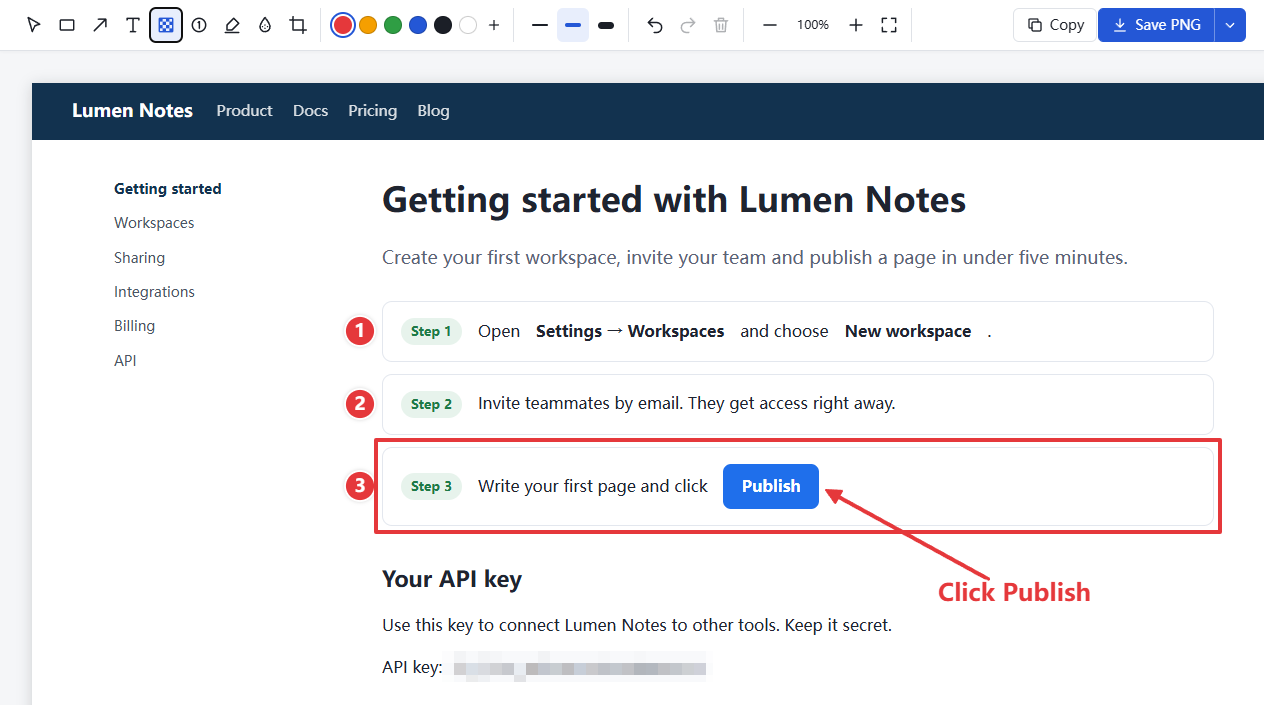
Boxes, arrows, text and irreversible pixelation. Crop, undo, then save as PNG or JPG or copy to the clipboard.
Record tab, window or screen
Tab sound, microphone and a camera bubble. Pause any time. Your recording is saved every second, so a crash doesn't lose it.
MP4 that plays everywhere
Save as MP4 or WebM, with a working progress bar in any player. No watermark and no time limit – on the free version too.
Keyboard first
Alt+Shift+S area · Alt+Shift+V visible · Alt+Shift+F full page · Alt+Shift+E record. Change them whenever you like.
Private by design, not by promise
PlainCapture has no server to send your captures to. You can check it yourself.
Nothing leaves your computer
Screenshots and recordings are stored in your browser until you save or delete them. The extension's pages are blocked from making network requests.
No account, no tracking
There's nothing to sign up for, and no analytics in the extension or on this website.
Minimal permissions
Installs with no "read your data on all websites" warning. Tab recording asks for permission only the first time you use it.
Free forever. Pro if you capture every day.
Everything in the free version stays free. No counters, no trial that runs out, no watermark.
Free
The full capture and recording tool.
- Unlimited screenshots: area, visible, full page
- Boxes, arrows, text, pixelate, crop
- Unlimited recordings up to 1080p, no time limit
- Tab sound, microphone and camera
- MP4 and WebM, no watermark
- No account, nothing uploaded
Pro
or $29 once for lifetime access – launch price, later $39
- Everything in Free
- Numbered steps, highlighter, blur, custom colors
- Export full pages as PDF (one page or A4)
- Save straight to a folder, with your own file names
- Record in 1440p or 4K, and at 60 fps
- Countdown before recording
Questions
Is the free version really free?
Yes. There is no limit on the number of screenshots or recordings, no time limit, and no watermark. Pro adds extra tools; it never takes anything away from the free version.
Are my screenshots or videos uploaded anywhere?
No. They are stored in your browser on your computer until you save them as files or delete them. PlainCapture has no server for them and its pages are technically blocked from network access.
Why does tab recording ask for access to "all your data on all websites"?
That's the wording Chrome uses for its tab-recording permission. PlainCapture only uses it to record the tab you start recording, never reads or changes page content, and only asks the first time you record a tab. Screen and window recording need no extra permission.
Can I record dropdown menus?
Some dropdowns are drawn outside the web page. Use "Screen / window" mode to capture them reliably.
Why can't I capture some pages?
Chrome doesn't allow any extension to capture its own pages (like settings) or the Chrome Web Store.
Does it work in Microsoft Edge?
Edge can install extensions from the Chrome Web Store. PlainCapture is built and tested for Chrome.
How do I activate Pro, or cancel a yearly plan?
After buying you receive a license key by email. Paste it in PlainCapture's settings and click Activate. To cancel a yearly plan, click Manage subscription in PlainCapture's settings or open the customer portal and sign in with your purchase email. You can also email support@plaincapture.com; Pro stays active until the end of the period you paid for.
How do refunds work?
You can get a full refund within 14 days of buying Pro, no questions asked. See the refund policy.
Support
Something not working? In PlainCapture's settings, click Copy diagnostics and email it with a short description to support@plaincapture.com. Diagnostics never include web addresses or page content.